صيانة اللاب توب ( الكمبيوتر المحمول ) Laptop Repair Workshop


qazxswedccc
:: مهندس ::
تاريخ التسجيل: Jun 2007
المشاركات: 24
نشاط [ qazxswedccc ]
قوة السمعة:
قديم 11-05-2008, 06:52 PM المشاركة 17   
افتراضي لو عايز تشغل هارد اللاب توب فى فكرة واعتقد كل الناس تعرفعا


If for some reason your notebook fails to boot and you need to access data on the hard drive (I assume there is nothing wrong with the hard drive itself), you can use an external USB enclosure. This method is very simple and could be very useful when you need an emergency access to your data on the hard drive.
First of all you’ll have to buy an external USB enclosure for notebook hard drives. These enclosures are inexpensive and usually you can buy them in any local computer store. You also can find a wide variety of external enclosures on the Internet. Make sure to buy a correct one, enclosures for ATA and SATA hard drives are different (the connector inside the case will be different). Usually the enclosure includes the case and the USB cables.
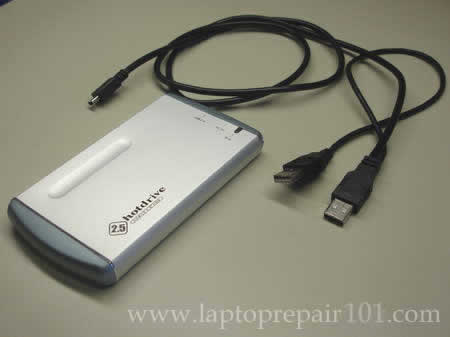
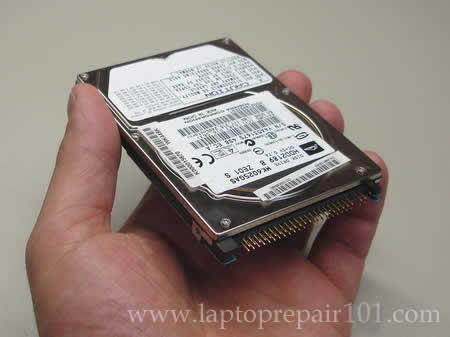
Now remove the hard drive from the laptop. For this example I’m using an ATA hard drive.
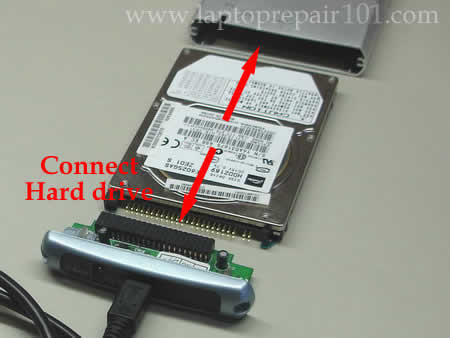
Open up the enclosure case and connect the hard drive to the connector inside. After that insert the hard drive into the case.
After everything is assembled, you are ready to connect this device to any working computer (notebook or PC). The enclosure cable usually has two USB connectors on one end, make sure both of them are connected to the computer. You don’t need any external power supply for the enclosure because the hard drive gets power through USB ports. If the computer you are connecting the enclosure to runs Windows 2000 or higher, you will not need any device drivers. As soon as you connect the enclosure to the computer, the external hard drive should be detected and recognized automatically. After that the external hard drive will appear in My Computer and you can access it as any other hard drive in the computer.

If you are getting “Access denied” message when you are trying to access your files on the hard drive, you’ll have to take ownership of a file or folder.

اعلانات

sta3000
:: مهندس ::
تاريخ التسجيل: May 2008
المشاركات: 2
نشاط [ sta3000 ]
قوة السمعة:
قديم 02-06-2008, 06:39 PM المشاركة 18   
افتراضي


وفقك الله دونيا واخره ونفعنا ونفعكم بالعلم الصالح

اعلانات اضافية ( قم بتسجيل الدخول لاخفائها )

kwkb
:: مهندس ::
تاريخ التسجيل: May 2004
المشاركات: 8
نشاط [ kwkb ]
قوة السمعة:
قديم 04-06-2008, 08:12 PM المشاركة 19   
Post تعلم صيانة اللابتوب


بارك الله فيك يا أخي أكيد شرح جميل ولكن الذي لايعرف إلا اللغة العربيه فين نصيبه أتمني أن أتعلم الصيانه باللغه العربيه وشكرا لك .
محمدامام


الصورة الرمزية NOOOOR
NOOOOR
:: عضو ذهبي ::
تاريخ التسجيل: Nov 2005
الدولة: مصر المنصورة
المشاركات: 1,085
نشاط [ NOOOOR ]
قوة السمعة:
قديم 17-06-2008, 06:08 PM المشاركة 20   
افتراضي


نقل موفق وشرح مرتب


الصورة الرمزية ahmedsaed
ahmedsaed
:: مهندس متواجد ::
تاريخ التسجيل: Apr 2007
المشاركات: 92
نشاط [ ahmedsaed ]
قوة السمعة:
قديم 08-10-2008, 01:30 AM المشاركة 21   
افتراضي


جزاك الله خير
خير الناس أنفعهم للناس


osamas
:: مهندس ::
تاريخ التسجيل: Aug 2008
المشاركات: 14
نشاط [ osamas ]
قوة السمعة:
قديم 16-10-2008, 09:35 PM المشاركة 22   
افتراضي شرح جيد جدا لاكن


شرح جيد جدا لاكن للو تكرم احد الاخوان بالترجمة يكون قدم الخير الكبير واكمل الموضوع


الصورة الرمزية م/محمود ادريس
م/محمود ادريس
:: عضو ذهبي ::
تاريخ التسجيل: Aug 2008
الدولة: www.Matrix219.com
المشاركات: 689
نشاط [ م/محمود ادريس ]
قوة السمعة:
قديم 19-10-2008, 10:18 PM المشاركة 23   
افتراضي


بارك الله فيك اخي


salahsalah731
:: عضو .. ::
تاريخ التسجيل: Jul 2007
المشاركات: 97
نشاط [ salahsalah731 ]
قوة السمعة:
قديم 11-12-2008, 03:30 PM المشاركة 24   
Thumbs up


موضوع غاية في الروعة

و عيدكم مبارك و دمنا لقريتنا


الساعة معتمدة بتوقيت جرينتش +3 الساعة الآن: 01:06 AM
موقع القرية الالكترونية غير مسؤول عن أي اتفاق تجاري أو تعاوني بين الأعضاء
فعلى كل شخص تحمل مسئولية نفسه إتجاه مايقوم به من بيع وشراء وإتفاق وأعطاء معلومات موقعه
التعليقات المنشورة لا تعبر عن رأي موقع القرية الالكترونية ولايتحمل الموقع أي مسؤولية قانونية حيال ذلك (ويتحمل كاتبها مسؤولية النشر)