صيانة اللاب توب ( الكمبيوتر المحمول ) Laptop Repair Workshop


الهاوى سات
:: مهندس ::
تاريخ التسجيل: Feb 2005
المشاركات: 35
نشاط [ الهاوى سات ]
قوة السمعة:
قديم 03-11-2012, 01:58 AM المشاركة 57   
Thumbs up


بارك الله فيك ومشكور على التعب والنقل الى قريتنا

اعلانات

inssanl
:: مهندس ::
تاريخ التسجيل: May 2011
المشاركات: 11
نشاط [ inssanl ]
قوة السمعة:
قديم 17-11-2012, 08:15 PM المشاركة 58   
افتراضي


جزاك الله خيرا اخي

اعلانات اضافية ( قم بتسجيل الدخول لاخفائها )

ramyanwer
:: مهندس متواجد ::
تاريخ التسجيل: Jun 2007
المشاركات: 59
نشاط [ ramyanwer ]
قوة السمعة:
قديم 18-11-2012, 04:44 AM المشاركة 59   
افتراضي


جزاك الله كل خير وربنا يزيدك من علمة ويباركلك في والديك و زوجتك وأولادك


dhiadabbas
:: مهندس ::
تاريخ التسجيل: Dec 2009
الدولة: ireland ,dublin
المشاركات: 29
نشاط [ dhiadabbas ]
قوة السمعة:
قديم 22-12-2012, 05:51 PM المشاركة 60   
افتراضي


اللهم وفقه واهله واهده واهدنا يا رب العالمين
تحياتي اخي الكريم


ahmed elasswi
:: مهندس ::
تاريخ التسجيل: Feb 2013
المشاركات: 1
نشاط [ ahmed elasswi ]
قوة السمعة:
قديم 17-02-2013, 12:40 AM المشاركة 61   
x4


موضوع جميل جداا جدااا وتغطية رائعة لكافة النقاط الهامة


mzmz_06
:: مهندس ::
تاريخ التسجيل: Jan 2007
المشاركات: 2
نشاط [ mzmz_06 ]
قوة السمعة:
قديم 10-03-2013, 02:49 PM المشاركة 62   
افتراضي


بارك الله فيك ووفقك الى ما فية الخير


moayyad55
:: مهندس ::
تاريخ التسجيل: Mar 2013
المشاركات: 1
نشاط [ moayyad55 ]
قوة السمعة:
قديم 11-03-2013, 08:42 PM المشاركة 63   
افتراضي خالص الشكر


جزاك الله كل خير على الموضوع الرائع


abdurahim724
:: مهندس ::
تاريخ التسجيل: Oct 2012
المشاركات: 4
نشاط [ abdurahim724 ]
قوة السمعة:
قديم 20-03-2013, 03:59 PM المشاركة 64   
افتراضي


اتفضلو دة الشرح بالصور لتغير الشاشة

بس ارجو من السادة المشرفين والقائمين على المنتدى تثبيت الموضوع حتى تعم الفائدة

استحلفكم باللة ان تدعو لى ولوالدى بالتوفيق والهداية

لا الله الا انت استغفرك واتوب اليك انى كنت من الظالمين

Posts filed under 'LCD Screen Repair'


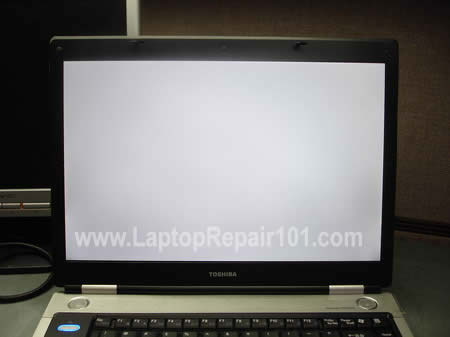
What can you do if the laptop LCD screen turned completely white? From my experience I can tell that this problem may be related to the following:
1. Loose connection between the video cable and the LCD screen.
2. Defective LCD screen.
3. Defective motherboard (I assume the graphics card is integrated into the motherboard).

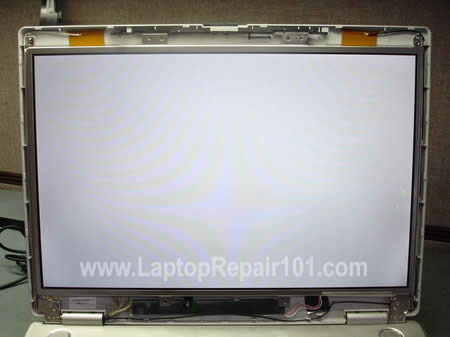
Here’s an example of a laptop with white screen. When you turn on the laptop, it starts but the image on the screen is completely white right from the beginning. In my case it was a Toshiba Satellite M45 laptop but this problem may occur with any other brand.


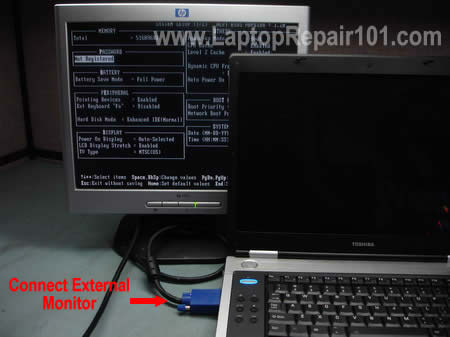
Most likely you still can use the laptop with an external monitor. Just connect the monitor to the VGA port on the back or side of your laptop and then switch the video output from internal to external mode.
On Toshiba laptops you can toggle between internal and external screens using Fn+F5 keys. Hold down Fn and press on F5 until you get video on the external monitor.
On IBM laptops use Fn+F7.
On HP laptops use Fn+F4.
It’s possible that you have to use a different key combination on your laptop but you get the idea.
On some laptops, in order to be able to use the external monitor, you have to connect it to the laptop and then restart the laptop so the external monitor is detected by the laptop.

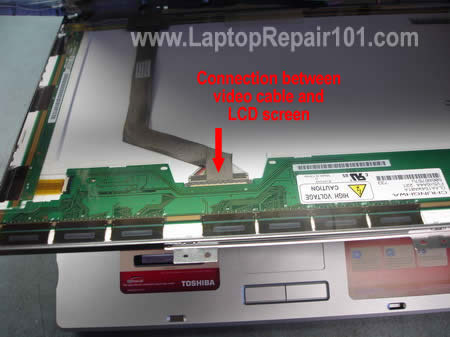
I noticed that in some cases the laptop screen may turn white because of poor connection between the video cable and the LCD screen. If you want to check this connection, you’ll have to take apart the display panel because the connector is located on the back side of the LCD screen.
These laptop service manuals and disassembly instructions may be useful.

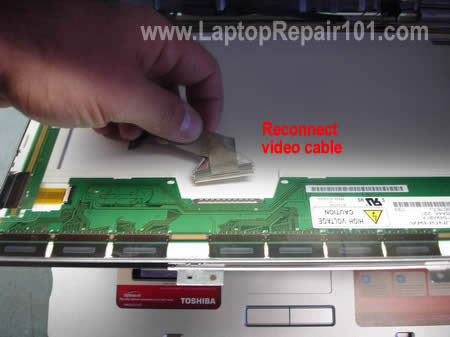
I always check the video cable connection first. Reconnecting the video cable may fix your problem.
If reconnecting the video cable doesn’t help, most likely you have a problem either with the LCD screen or with the motherboard.

The best way to find out witch one is causing the problem is testing the laptop with another working LCD screen. Without this test you’ll have to guess because as I mentioned before this could either bad motherboard or bad LCD screen.
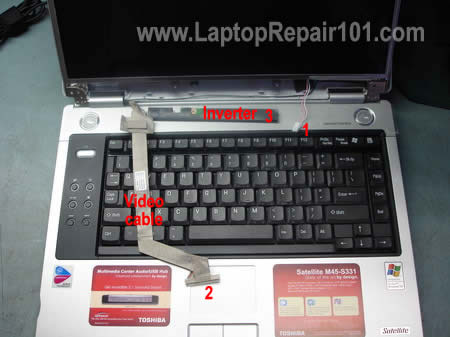
You’ll have to disconnect the video cable from the LCD screen (connector 2) and the inverter board (connectors 3 and 1). After that you connect another working screen and test video.

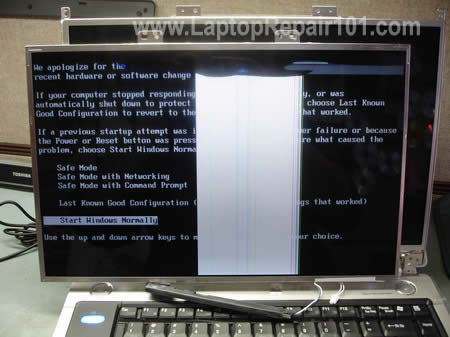
For this purpose I’m using one of my test LCD screens. My test screen is cracked and because of that you see a wide white band in the center but it still works fine for this test.
The original screen is white but my test screen works normal (except the crack of course) and I can see the image. After this test I can tell that the problem must be related to the screen.

After I assembled everything back together and connected the original LCD, it’s still white.
الموضوع غني بالمعاومات ولكن اتمنى ان يكون على شكل ملف واحد .. شكا على الجهد المبذول


الساعة معتمدة بتوقيت جرينتش +3 الساعة الآن: 01:06 AM
موقع القرية الالكترونية غير مسؤول عن أي اتفاق تجاري أو تعاوني بين الأعضاء
فعلى كل شخص تحمل مسئولية نفسه إتجاه مايقوم به من بيع وشراء وإتفاق وأعطاء معلومات موقعه
التعليقات المنشورة لا تعبر عن رأي موقع القرية الالكترونية ولايتحمل الموقع أي مسؤولية قانونية حيال ذلك (ويتحمل كاتبها مسؤولية النشر)